Street (View) Photography Street (View) Photography
Screenshotting can be technically understood as a 1:1 copy of the computer screen. Yet it can also be seen as a photographic act, in a world that is increasingly rendered on the screen, mapped digitally in virtual maps.
Among many online platforms that can be explored by photographers with out a camera, Google Street View has become one of the most popular destination for screenshotters. Drawing from different traditions such as street photography and photojournalism, many photographers and artists have explored Google Street View through screenshots, while bringing a photographic approach and mindset.
Study Cases
Jon Rafman, Nine Eyes of Google Street View, 2008 – ongoing

"Nine Eyes of Google Street View is both an archival project and a conceptual meditation on the state of photography in a time of automated imagemaking on a massive scale. In 2008, Jon Rafman began to collect screenshots of images from Google Street View. At the time, Street View was a relatively new initiative, an effort to document everything in the world that could be seen from a moving car. A massive, undiscerning machine for image-making whose purpose is to simply capture everything, Street View takes photographs without apparent concern for ethics or aesthetics, from a supposedly neutral point of view. Rafman conducted a close reading of Google Street View and began to isolate images from this massive database, publishing them on blogs, as PDFs, in books, and as large C-prints for gallery exhibition. In so doing, he reframed them within longer histories of photography and painting, raising questions about the meaning and function of these images and their implications for artists and image-makers." – Michael Connor, Aria Dean, Dragan Espenschied (eds), The Art Happens Here: Net Art Anthology, Rhizome, New York 2019.
- More about Nine Eyes of Google Street View: 9-eyes.com
- Interview with Jon Rafman: youtube.com/watch?v=vBWdYrO6y_E
Jacqui Kenny, Agoraphobic Traveller, 2016 – ongoing

"Jacqui Kenny, a New Zealander living in London, began exploring the world on Google Street View. At first, she would pick locales more or less at random, poking around the streets of faraway towns and taking screenshots whenever she stumbled upon a striking image. After a while, she began seeking out certain kinds of views: arid regions with clear horizons; latitudes where she found that the sunlight fell at a dramatic slant. She was soon spending many hours on the project, which became a kind of retreat. “I really didn’t know what I was going to do with my life,” she told me. “I wasn’t in the mood to face the world yet, and this absorbed a lot of my focus.” When she looked back after a year of taking screenshots, she had accumulated an archive of around twenty-six thousand photos. Kenny now posts photos from the collection on an Instagram account called Agoraphobic Traveller, a reference to another impetus behind the project: Kenny, who is friendly and witty in conversation, suffers from anxiety that, on a bad day, can make it difficult to leave the house. [...] The Street View project has become a way for Kenny to visit places that she could never go to herself—the more remote, the better, she said. It’s also a practice that involves a tension between control and surrender: she has the ability to parachute into anywhere in the world, but her views and angles and lighting are in Google’s hands. “So many times,” she said, “I’ll see something in the distance that looks amazing, but then the car stops or something gets in the way. It happens ninety per cent of the time. I always have to be prepared for that disappointment.”" – Andrea DenHoed, "An Agoraphobic Photographer’s Virtual Travels, on Google Street View", The New Yorker, June 29, 2017
- More about Agoraphobic Traveller: instagram.com/streetview.portraits
-
Ep 5: The Agoraphobic Traveller SEARCH ON: youtube.com/watch?v=pSJoP0LR8CQ
Jenny Odell, Temporal Portraits of People on Streetview, 2014

Temporal Portraits of People on Streetview shows images "taken from screenshots of Google Street View. Inadvertently reminsicent of Muybridge's motion studies, the disorienting composites involve three sources of motion: the person walking, the Google Streetview car driving, and [the artist] turning in the Streetview browser in order to keep the subject in view." – Odell, J. Artist website
- More about Temporal Portraits of People on Streetview: jennyodell.com/temporal-portraits.html
Viktoria Binschtok, World of Details, 2013
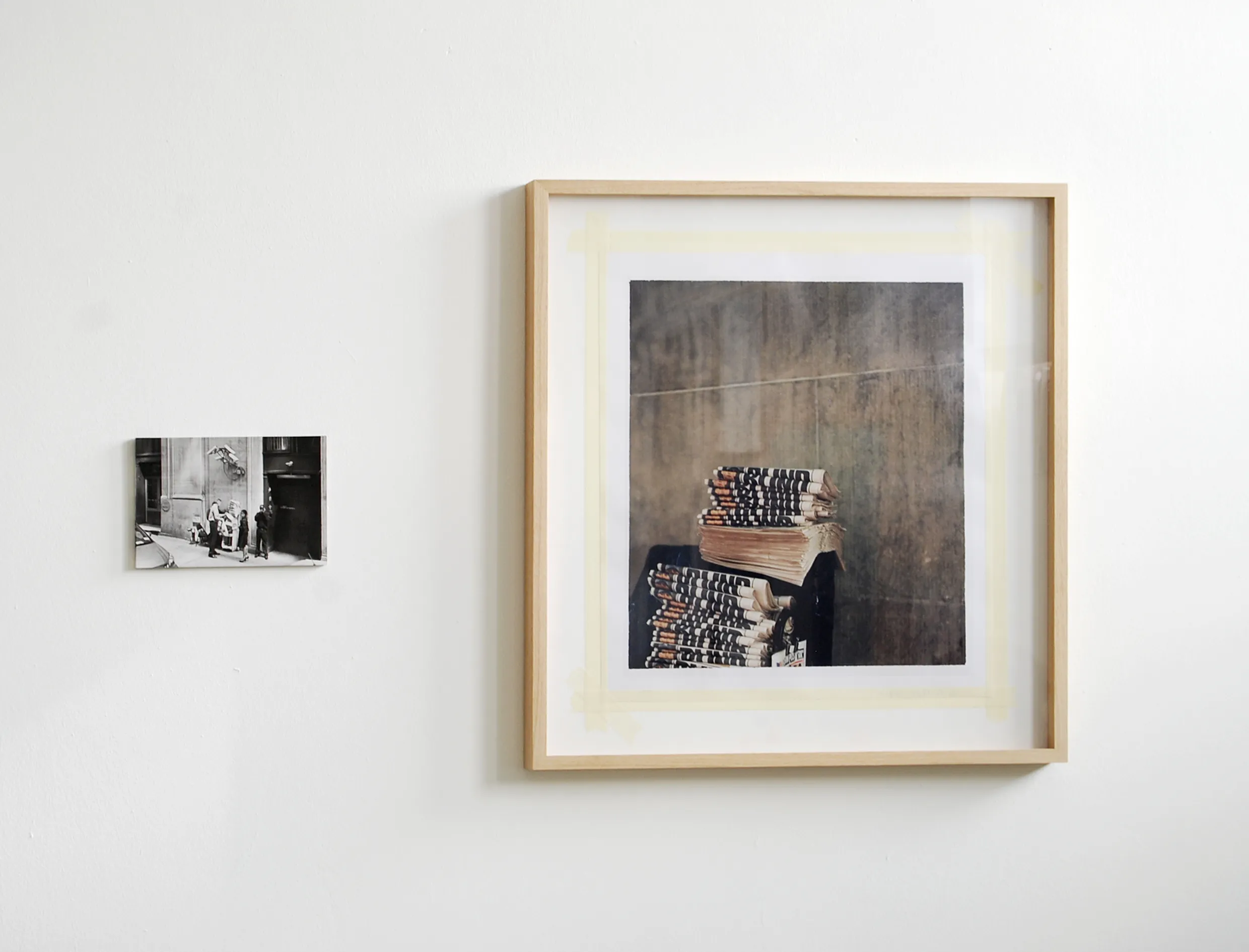
"Every time and generation has its own new sources of information. Today, for instance, with its pool of worldwide images, Google Street View is a kind of visual quarry that artists also dig around in, among them Viktoria Binschtok. Binschtok begins each of her works by appropriating images from this source. Her method is that of a two-part search: both for a fitting image to work from and an after-image to be finally realized on location. In this respect, a before-and-after effect exists not only in content, but also in terms of time. Yet both images, which Binschtok later arranges into an unequal diptych, seem removed from time, contemporary in a timeless way; it's impossible to determine the date the photographs were taken. The artist does her research in Berlin, where she lives, and then she takes the actual photographs in New York. This gives rise to a fascinating exploration into time and the things that change or don't change between the taking of the first and second images. There are several interesting dualisms inscribed into the project; there is also the opposition between the systematic recording process of a machine meant to provide a documentation of the current urban situation that is as comprehensive as possible (and that becomes the past as soon as the photograph is taken), and the artistic, human camera eye that has another type of documentation as its intent. Technical differences in the types of photography used are also present: on the one hand, the anonymous, digital shot that theoretically anyone with access to the Internet anywhere in the world has access to, and on the other an artist's analogue camera image that is initially printed in a small edition and only becomes accessible to a wider audience for the first time through this publication. Thus, the reception of the world, the process of image recording, and the distribution of the image could hardly be more different from one another." – Harder, M. (2013). World of Details. DISTANZ Verlag.
- More about World of Details: viktoriabinschtok.com/work-3/work-2
Mario Santamaria, Non-Imaginary Museum, 2013–ongoing

"Mario Santamaría is part of a growing canon of screenshot photographers drawn to the uncanny crash of interface, database, camera and screen produced by the ‘nine eyes’ of the Google Street View camera. In contrast with other artists who have heroically pointed their mouse at the dazzling vastness of the Google Street View landscape, Santamaría has weaponised the screenshot to probe Google’s scopic regime and the sociotechnical infrastructure that sustains it. In 2013 the artist began a trilogy of works in response to Google Art Project, a cultural interface launched in 2011 hosting virtual tours of over 2,000 leading museums and their collections. A spectacular feat of engineering and cultural diplomacy, Google Art Project functions as a photographic apparatus which depends on Google Street View technology and custom Gigapixel cameras to produce an immersive space for consuming art. In Trolling Google Art Project (2013–ongoing) Mario Santamaría mobilises the screenshot as an artistic strategy to break the transparency of Google’s interface and expose its representational paradigm. [...] The Non-Imaginary Museum (2013–ongoing), [...] presents artworks adorning the walls of the Google Art Project that have been obscured and rendered unintelligible by a Gaussian algorithm due to copyright restrictions. Probing the limits of Google’s reproductive paradigm, these screenshots appear to undermine Google’s emphasis on universal access to public culture. Santamaría draws attention to the way different values are encoded into the interface, arguing 'these works are blurred because their time of economic exploitation continues, because they are commercialised in another place or another format'. The screenshot captures a moment where analogue models of value are encoded into a computational environment: echoed by the remediation of the photographic act in the gesture of the screen capture itself."
– Sluis, K. (2022). The Phantom of the Mirror: The Screenshots of Mario Santamaría. In W. Gerling, S. Möring, & M. De Mutiis (Eds.), Screen Images: In-Game Photography, Screenshot, Screencast (pp. 289-293). Kulturverlag Kadmos.
- More about Non-Imaginary Museum: righted-museum.tumblr.com
- Screen Walk with Mario Santamaria: youtube.com/watch?v=JAak7Fr5Aqk
Azahara Cerezo, Paisajes digitales de una guerra, 2015

"Paisajes digitales de una guerra (tr. Digital landscapes from a war) collects images of political graffiti found in areas known to have been sites of political unrest during the Spanish Civil War (1936−1939) through the lens of Google Street View. Messages appear on walls and surfaces in a temporary and rushed way: messages are written, crossed out, rewritten, erased, etc. Google captures sceneries in a similar manner, taking photographs in different moments and stitching them together to form panoramas and layers of time. The present selection includes three images found in the University City of Madrid, which was a Republican defensive line during the conflict. The project is an ongoing archive and extends to other settings, such as the port area of Cartagena, from which the Republican Navy made their escape, and the old town of Pamplona (Navarra), which came quickly under the control by the rebel side." – W. Gerling, S. Möring, & M. De Mutiis (Eds.), Screen Images: In-Game Photography, Screenshot, Screencast (pp. 171). Kulturverlag Kadmos.
Tutorial
How to Take a Screenshot
Before exploring Google Street View as a photographic tool, you need to know how to capture what’s on your screen. Below is a quick reference for every major platform.
Mac
| Action | Shortcut |
|---|---|
| Capture entire screen | ⌘ Command + Shift + 3 |
| Capture a selected area | ⌘ Command + Shift + 4, then drag to select |
| Capture a specific window | ⌘ Command + Shift + 4, then press Spacebar and click the window |
| Copy screenshot to clipboard | Hold Control together with any shortcut above |
| Open Screenshot app | ⌘ Command + Shift + 5 |
Screenshots are saved as PNG files on your Desktop by default. Use the Screenshot app (⌘ Command + Shift + 5) for additional options like screen recording and changing the save location.
Windows
| Action | Shortcut |
|---|---|
| Capture a selected area | Win + Shift + S, then drag to select |
| Paste from clipboard | Ctrl + V into any application |
After pressing Win + Shift + S, the screenshot is copied to your clipboard. You can paste it directly into a document, or open Paint to paste and save it as a file. For more options, search for “Snipping Tool” in the Start menu.
iOS / iPadOS
| Action | Shortcut |
|---|---|
| iPhones and iPads without Home button | Hold Sleep/Wake, then press Volume Up |
| iPhones and iPads with Home button | Hold Sleep/Wake, then press Home |
The screen will flash white. Screenshots are saved in the Photos app.
Android
| Action | Shortcut |
|---|---|
| Most Android devices | Hold Volume Down + Power for 1–2 seconds |
| Older devices with Home button | Hold Home + Power for 1–2 seconds |
The screen will flash white. Screenshots are saved in the Screenshots folder in your Gallery or Photos app.
Linux
| Action | Shortcut |
|---|---|
| Capture entire screen | PrtScn |
| Capture a single window | Alt + PrtScn |
The PrtScn key is usually found in the upper right area of your keyboard. On most desktop environments (KDE, GNOME, XFCE), pressing it will either capture the screen directly or open a screenshot tool.
Assignment
Explore Google Street View with a photographic approach, and take a series of 5-10 screenshots. You can base your screenshots on a specific theme, geographic region, photographic tradition, or artistic practice from the examples seen in class.