Street (View) Photography Street (View) Fotografie
Screenshotting can be technically understood as a 1:1 copy of the computer screen. Yet it can also be seen as a photographic act, in a world that is increasingly rendered on the screen, mapped digitally in virtual maps.
Among many online platforms that can be explored by photographers without a camera, Google Street View has become one of the most popular destinations for screenshotters. Drawing from different traditions such as street photography and photojournalism, many photographers and artists have explored Google Street View through screenshots, while bringing a photographic approach and mindset.
Study Cases
Jon Rafman, Nine Eyes of Google Street View, 2008 – ongoing
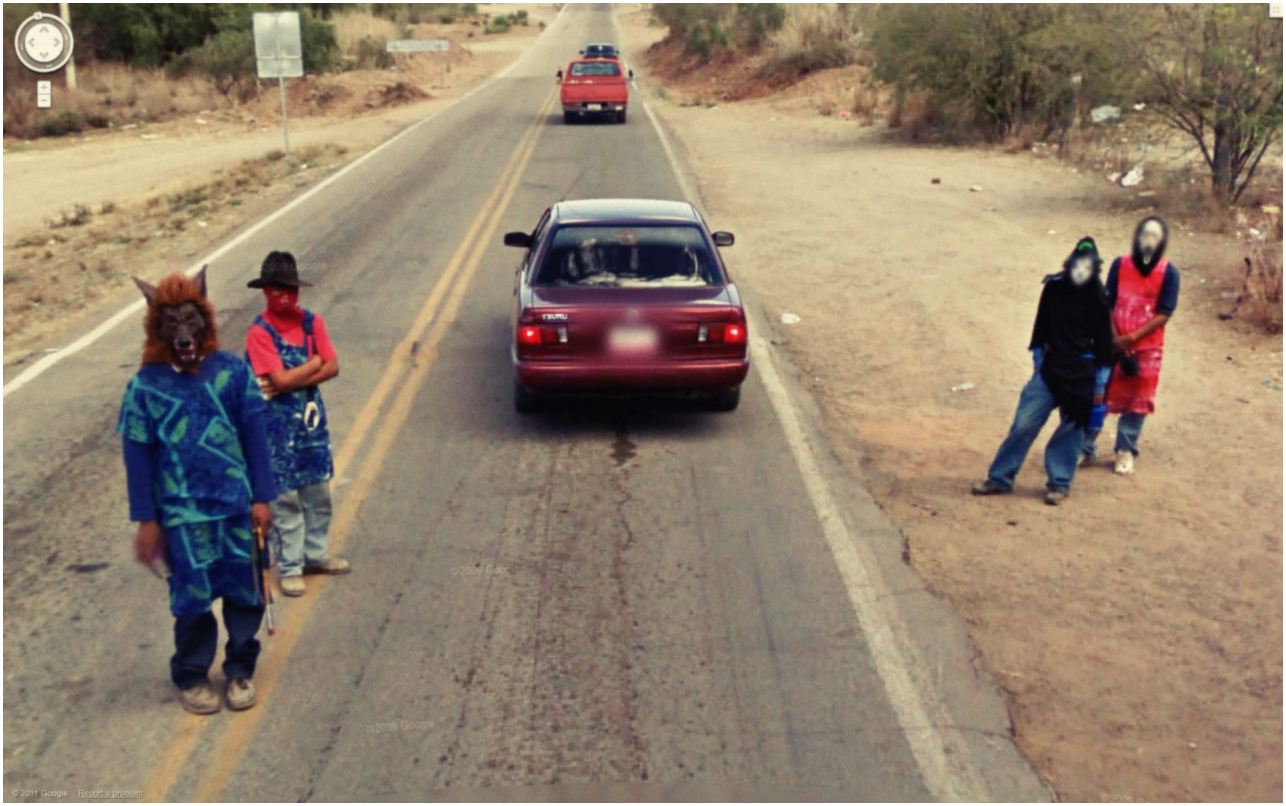
"Nine Eyes of Google Street View is both an archival project and a conceptual meditation on the state of photography in a time of automated imagemaking on a massive scale. In 2008, Jon Rafman began to collect screenshots of images from Google Street View. At the time, Street View was a relatively new initiative, an effort to document everything in the world that could be seen from a moving car. A massive, undiscerning machine for image-making whose purpose is to simply capture everything, Street View takes photographs without apparent concern for ethics or aesthetics, from a supposedly neutral point of view. Rafman conducted a close reading of Google Street View and began to isolate images from this massive database, publishing them on blogs, as PDFs, in books, and as large C-prints for gallery exhibition. In so doing, he reframed them within longer histories of photography and painting, raising questions about the meaning and function of these images and their implications for artists and image-makers." – Michael Connor, Aria Dean, Dragan Espenschied (eds), The Art Happens Here: Net Art Anthology, Rhizome, New York 2019.
- More about Nine Eyes of Google Street View: 9-eyes.com
- Interview with Jon Rafman: youtube.com/watch?v=vBWdYrO6y_E
Jacqui Kenny, Agoraphobic Traveller, 2016 – ongoing
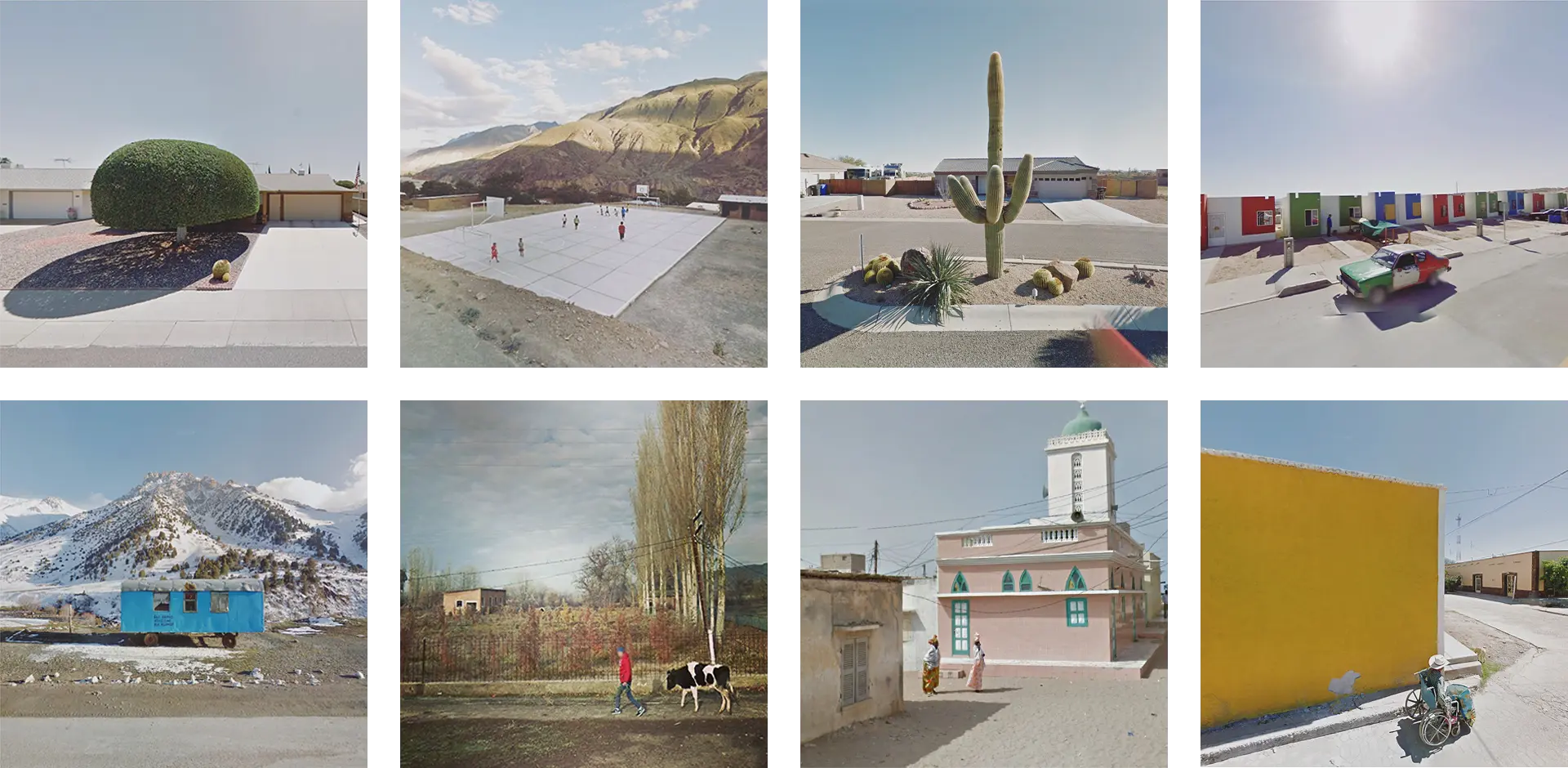
"Jacqui Kenny, a New Zealander living in London, began exploring the world on Google Street View. At first, she would pick locales more or less at random, poking around the streets of faraway towns and taking screenshots whenever she stumbled upon a striking image. After a while, she began seeking out certain kinds of views: arid regions with clear horizons; latitudes where she found that the sunlight fell at a dramatic slant. She was soon spending many hours on the project, which became a kind of retreat. "I really didn't know what I was going to do with my life," she told me. "I wasn't in the mood to face the world yet, and this absorbed a lot of my focus." When she looked back after a year of taking screenshots, she had accumulated an archive of around twenty-six thousand photos. Kenny now posts photos from the collection on an Instagram account called Agoraphobic Traveller, a reference to another impetus behind the project: Kenny, who is friendly and witty in conversation, suffers from anxiety that, on a bad day, can make it difficult to leave the house. [...] The Street View project has become a way for Kenny to visit places that she could never go to herself—the more remote, the better, she said. It's also a practice that involves a tension between control and surrender: she has the ability to parachute into anywhere in the world, but her views and angles and lighting are in Google's hands. "So many times," she said, "I'll see something in the distance that looks amazing, but then the car stops or something gets in the way. It happens ninety per cent of the time. I always have to be prepared for that disappointment."" – Andrea DenHoed, "An Agoraphobic Photographer's Virtual Travels, on Google Street View", The New Yorker, June 29, 2017
- More about Agoraphobic Traveller: instagram.com/streetview.portraits
-
Ep 5: The Agoraphobic Traveller SEARCH ON: youtube.com/watch?v=pSJoP0LR8CQ
Jenny Odell, Temporal Portraits of People on Streetview, 2014
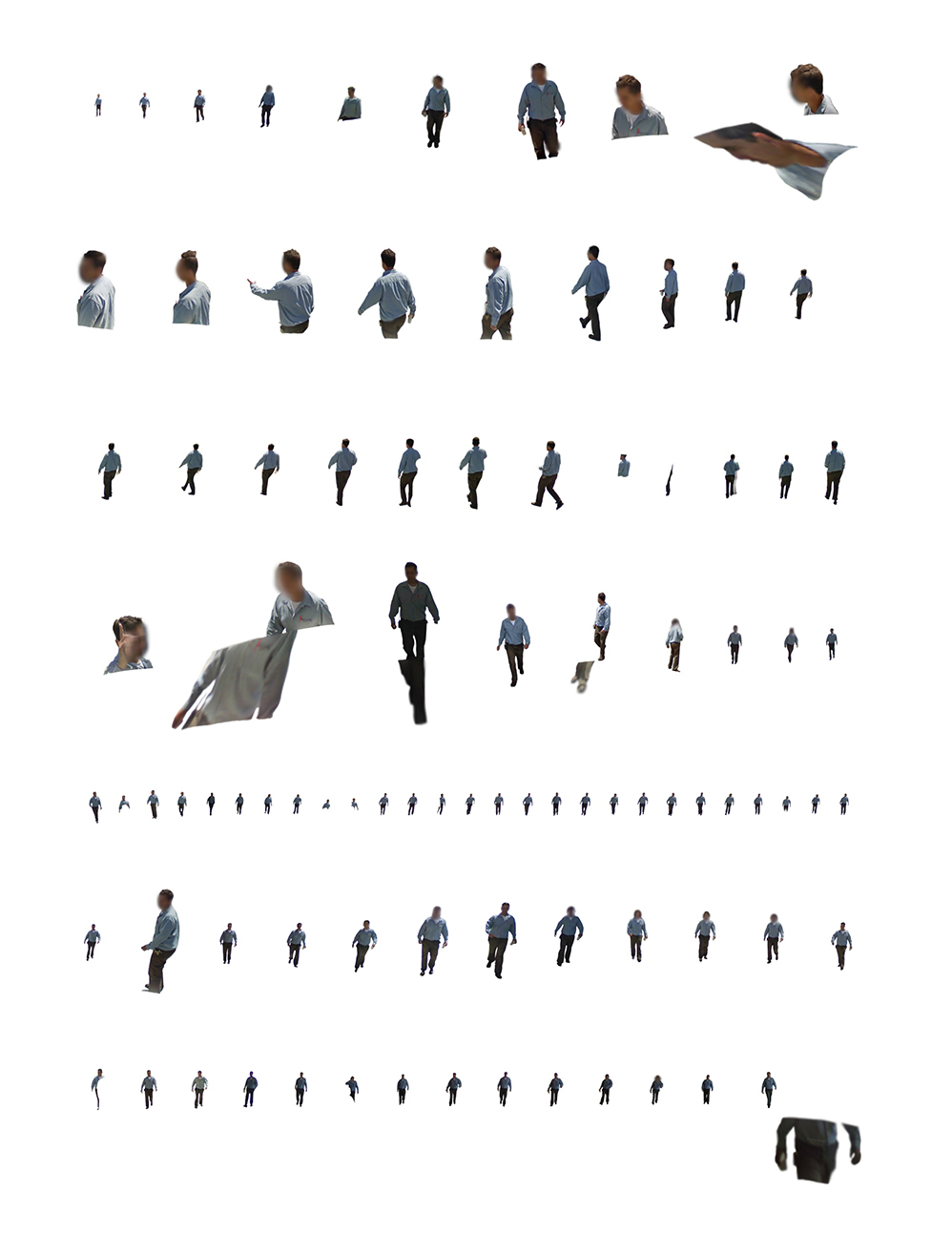
Temporal Portraits of People on Streetview shows images "taken from screenshots of Google Street View. Inadvertently reminiscent of Muybridge's motion studies, the disorienting composites involve three sources of motion: the person walking, the Google Streetview car driving, and [the artist] turning in the Streetview browser in order to keep the subject in view." – Odell, J. Artist website
- More about Temporal Portraits of People on Streetview: jennyodell.com/temporal-portraits.html
Viktoria Binschtok, World of Details, 2013
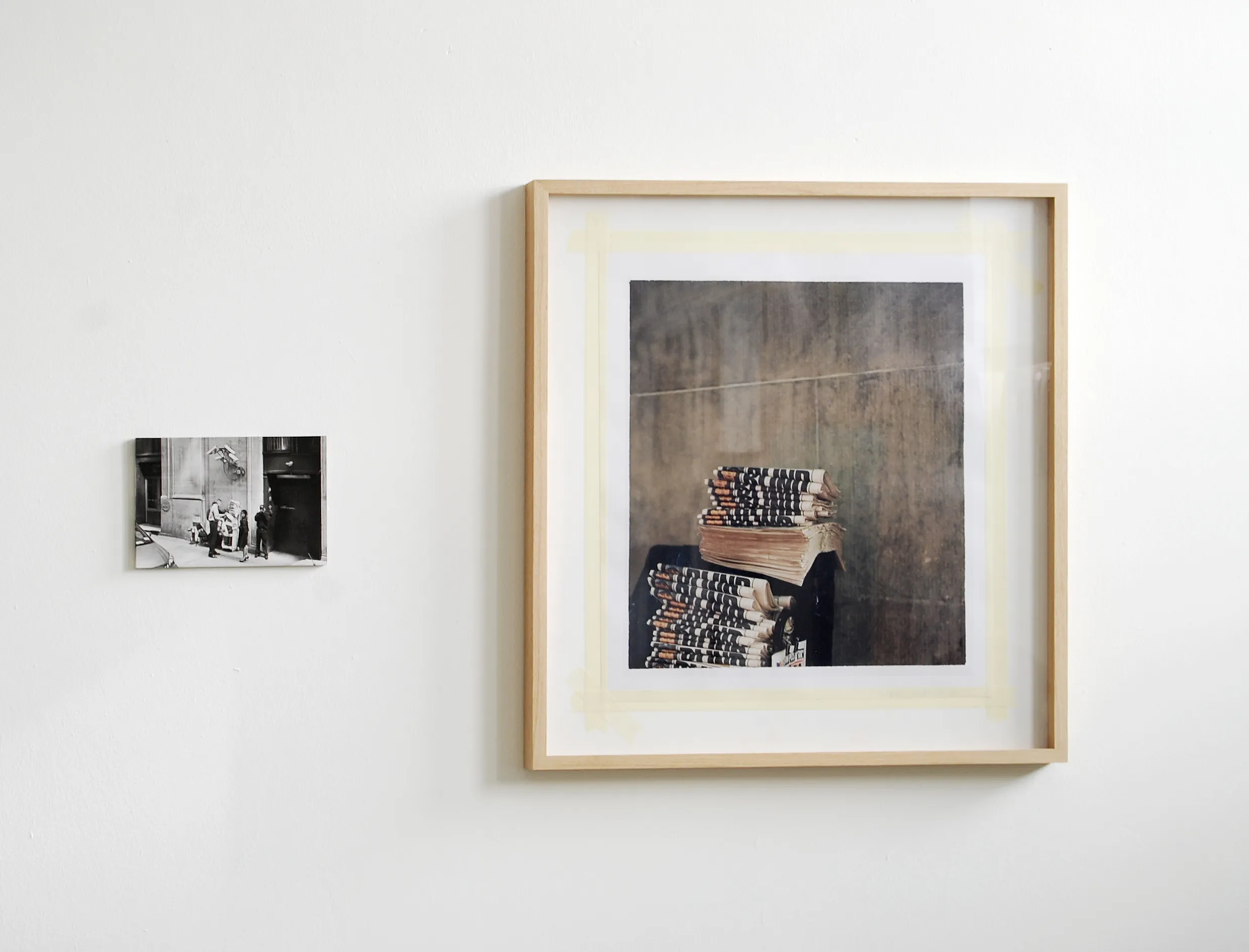
"Every time and generation has its own new sources of information. Today, for instance, with its pool of worldwide images, Google Street View is a kind of visual quarry that artists also dig around in, among them Viktoria Binschtok. Binschtok begins each of her works by appropriating images from this source. Her method is that of a two-part search: both for a fitting image to work from and an after-image to be finally realized on location. In this respect, a before-and-after effect exists not only in content, but also in terms of time. Yet both images, which Binschtok later arranges into an unequal diptych, seem removed from time, contemporary in a timeless way; it's impossible to determine the date the photographs were taken. The artist does her research in Berlin, where she lives, and then she takes the actual photographs in New York. This gives rise to a fascinating exploration into time and the things that change or don't change between the taking of the first and second images. There are several interesting dualisms inscribed into the project; there is also the opposition between the systematic recording process of a machine meant to provide a documentation of the current urban situation that is as comprehensive as possible (and that becomes the past as soon as the photograph is taken), and the artistic, human camera eye that has another type of documentation as its intent. Technical differences in the types of photography used are also present: on the one hand, the anonymous, digital shot that theoretically anyone with access to the Internet anywhere in the world has access to, and on the other an artist's analogue camera image that is initially printed in a small edition and only becomes accessible to a wider audience for the first time through this publication. Thus, the reception of the world, the process of image recording, and the distribution of the image could hardly be more different from one another." – Harder, M. (2013). World of Details. DISTANZ Verlag.
- More about World of Details: viktoriabinschtok.com/work-3/work-2
Mario Santamaria, Non-Imaginary Museum, 2013–ongoing
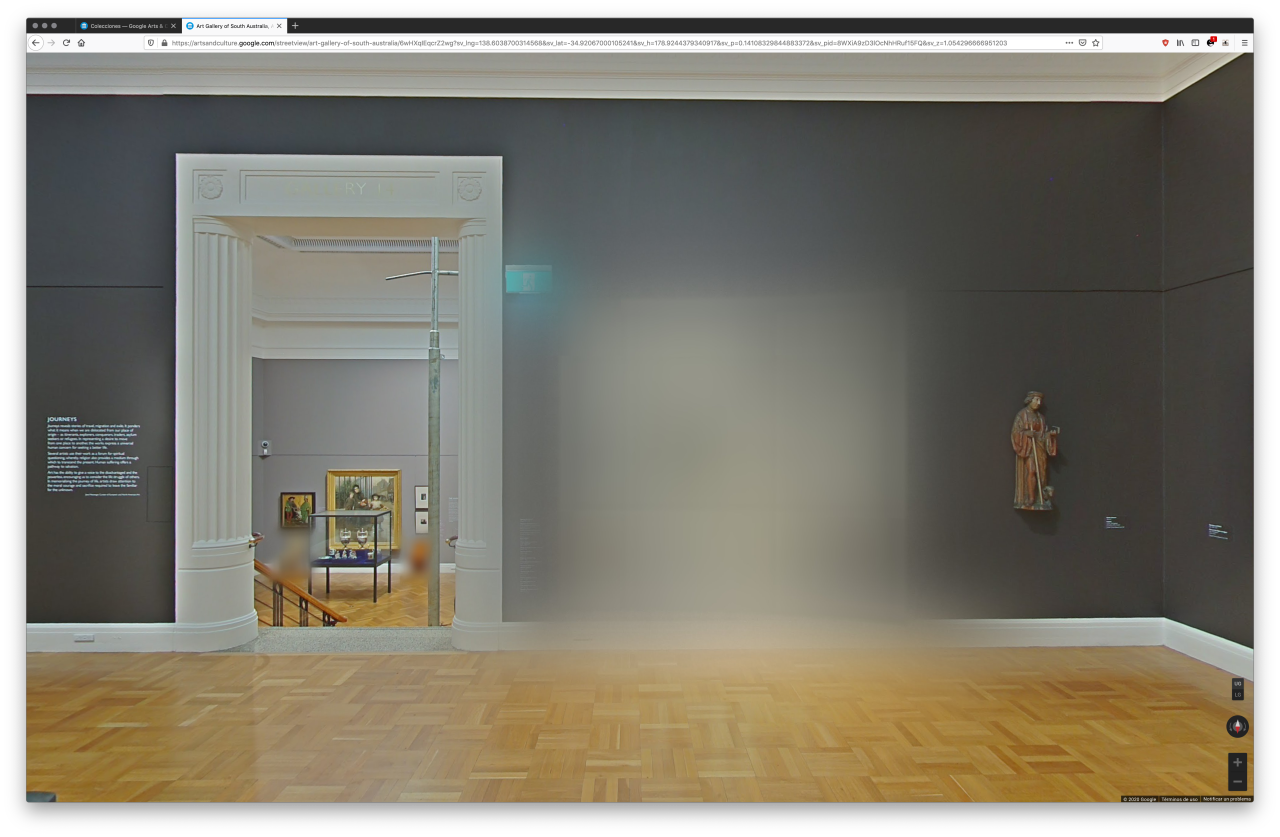
"Mario Santamaría is part of a growing canon of screenshot photographers drawn to the uncanny crash of interface, database, camera and screen produced by the 'nine eyes' of the Google Street View camera. In contrast with other artists who have heroically pointed their mouse at the dazzling vastness of the Google Street View landscape, Santamaría has weaponised the screenshot to probe Google's scopic regime and the sociotechnical infrastructure that sustains it. In 2013 the artist began a trilogy of works in response to Google Art Project, a cultural interface launched in 2011 hosting virtual tours of over 2,000 leading museums and their collections. A spectacular feat of engineering and cultural diplomacy, Google Art Project functions as a photographic apparatus which depends on Google Street View technology and custom Gigapixel cameras to produce an immersive space for consuming art. In Trolling Google Art Project (2013–ongoing) Mario Santamaría mobilises the screenshot as an artistic strategy to break the transparency of Google's interface and expose its representational paradigm. [...] The Non-Imaginary Museum (2013–ongoing), [...] presents artworks adorning the walls of the Google Art Project that have been obscured and rendered unintelligible by a Gaussian algorithm due to copyright restrictions. Probing the limits of Google's reproductive paradigm, these screenshots appear to undermine Google's emphasis on universal access to public culture. Santamaría draws attention to the way different values are encoded into the interface, arguing 'these works are blurred because their time of economic exploitation continues, because they are commercialised in another place or another format'. The screenshot captures a moment where analogue models of value are encoded into a computational environment: echoed by the remediation of the photographic act in the gesture of the screen capture itself."
– Sluis, K. (2022). The Phantom of the Mirror: The Screenshots of Mario Santamaría. In W. Gerling, S. Möring, & M. De Mutiis (Eds.), Screen Images: In-Game Photography, Screenshot, Screencast (pp. 289-293). Kulturverlag Kadmos.
- More about Non-Imaginary Museum: righted-museum.tumblr.com
- Screen Walk with Mario Santamaria: youtube.com/watch?v=JAak7Fr5Aqk
Azahara Cerezo, Paisajes digitales de una guerra, 2015
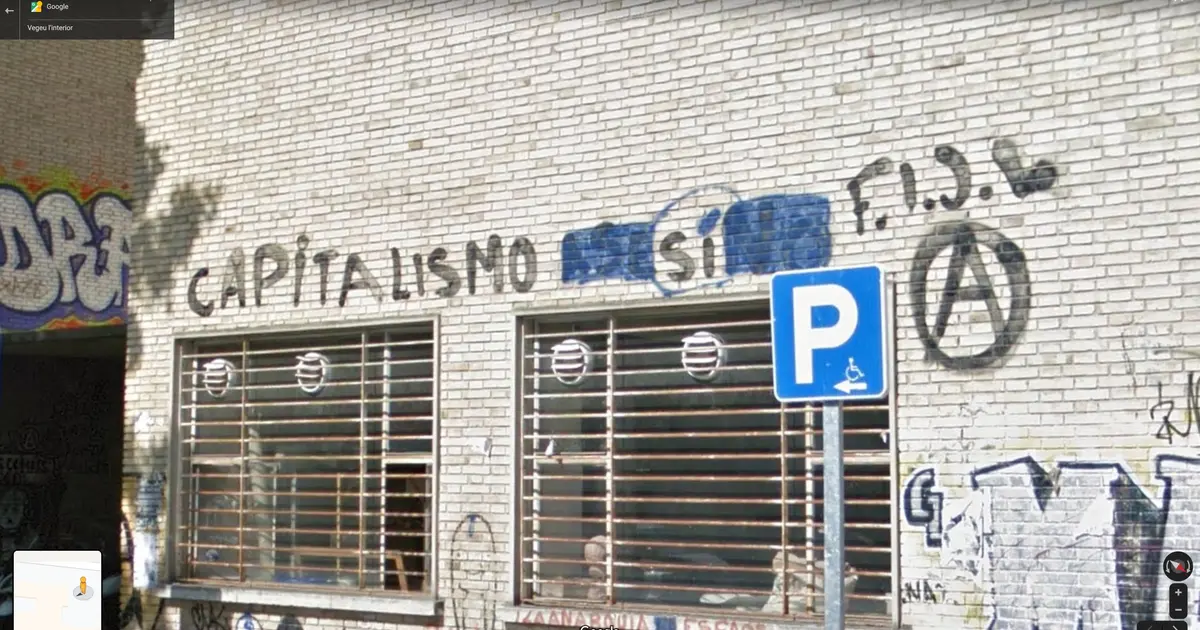
"Paisajes digitales de una guerra (tr. Digital landscapes from a war) collects images of political graffiti found in areas known to have been sites of political unrest during the Spanish Civil War (1936−1939) through the lens of Google Street View. Messages appear on walls and surfaces in a temporary and rushed way: messages are written, crossed out, rewritten, erased, etc. Google captures sceneries in a similar manner, taking photographs in different moments and stitching them together to form panoramas and layers of time. The present selection includes three images found in the University City of Madrid, which was a Republican defensive line during the conflict. The project is an ongoing archive and extends to other settings, such as the port area of Cartagena, from which the Republican Navy made their escape, and the old town of Pamplona (Navarra), which came quickly under the control by the rebel side." – W. Gerling, S. Möring, & M. De Mutiis (Eds.), Screen Images: In-Game Photography, Screenshot, Screencast (pp. 171). Kulturverlag Kadmos.
Emilio Vavarella, The Driver and the Cameras, 2012
Paolo Cirio, Street Ghosts, 2012–2017
Michael Wolf, A Series of Unfortunate Events, 2010
Mishka Henner, No Man’s Land, 2011–2013
Roberto Feijoo, Berlin Alexanderplatz, 2012–2013
Robin Hewlett and Ben Kinsley, Street with a View, 2008
Matteo Bittanti, Google Street View Racing, 2017
Aram Bartholl, 15 Seconds of Fame, 2010
Carlo Zanni, Self Portrait with Dog, 2008
Greg Allen, Walking Man, 2010
Andres Galeano, Google In View, 2014–ongoing
Halley Docherty, Street View series for The Guardian, 2014
Ruben Torras, Road Movies, 2016
Daniel Mayrit, Suburban Scenes, 2012
Amber Eve Anderson, Views from Paradise, 2017
Sylvia Grace Borda in collaboration with John M Lynch, Mise en Scene: Farm Tableaux Finland, 2015
Justin Blinder, Wikipedia Was Here, 2018
Sasha R Gregor (AKA Roger Grasas), Beagle 2.0, 2017
Alex Alsup, GooBing Detroit, 2014–ongoing
Tutorial
How to Take a Screenshot
Before exploring Google Street View as a photographic tool, you need to know how to capture what’s on your screen. Below is a quick reference for every major platform.
Mac
| Action | Shortcut |
|---|---|
| Capture entire screen | ⌘ Command + Shift + 3 |
| Capture a selected area | ⌘ Command + Shift + 4, then drag to select |
| Capture a specific window | ⌘ Command + Shift + 4, then press Spacebar and click the window |
| Copy screenshot to clipboard | Hold Control together with any shortcut above |
| Open Screenshot app | ⌘ Command + Shift + 5 |
Screenshots are saved as PNG files on your Desktop by default. Use the Screenshot app (⌘ Command + Shift + 5) for additional options like screen recording and changing the save location.
Windows
| Action | Shortcut |
|---|---|
| Capture a selected area | Win + Shift + S, then drag to select |
| Paste from clipboard | Ctrl + V into any application |
After pressing Win + Shift + S, the screenshot is copied to your clipboard. You can paste it directly into a document, or open Paint to paste and save it as a file. For more options, search for “Snipping Tool” in the Start menu.
iOS / iPadOS
| Action | Shortcut |
|---|---|
| iPhones and iPads without Home button | Hold Sleep/Wake, then press Volume Up |
| iPhones and iPads with Home button | Hold Sleep/Wake, then press Home |
The screen will flash white. Screenshots are saved in the Photos app.
Android
| Action | Shortcut |
|---|---|
| Most Android devices | Hold Volume Down + Power for 1–2 seconds |
| Older devices with Home button | Hold Home + Power for 1–2 seconds |
The screen will flash white. Screenshots are saved in the Screenshots folder in your Gallery or Photos app.
Linux
| Action | Shortcut |
|---|---|
| Capture entire screen | PrtScn |
| Capture a single window | Alt + PrtScn |
The PrtScn key is usually found in the upper right area of your keyboard. On most desktop environments (KDE, GNOME, XFCE), pressing it will either capture the screen directly or open a screenshot tool.
Assignment
Explore Google Street View with a photographic approach, and take a series of 5-10 screenshots. You can base your screenshots on a specific theme, geographic region, photographic tradition, or artistic practice from the examples seen in class.
Ein Screenshot lässt sich technisch als 1:1-Kopie des Computerbildschirms verstehen. Er kann jedoch auch als fotografischer Akt begriffen werden – in einer Welt, die zunehmend auf dem Bildschirm abgebildet und digital kartiert wird.
Unter den vielen Online-Plattformen, die Fotografinnen und Fotografen ohne Kamera erkunden können, ist Google Street View zu einem der beliebtesten Ziele für Screenshot-Fotografie geworden. Viele Künstlerinnen und Künstler haben Google Street View mit einem fotografischen Ansatz und einer fotografischen Haltung erkundet – dabei schöpfen sie aus unterschiedlichen Traditionen wie der Straßenfotografie und dem Fotojournalismus.
Fallbeispiele
Jon Rafman, Nine Eyes of Google Street View, 2008 – fortlaufend
„Nine Eyes of Google Street View ist zugleich ein Archivprojekt und eine konzeptuelle Reflexion über den Zustand der Fotografie in einer Zeit der automatisierten Bilderzeugung im großen Maßstab. Im Jahr 2008 begann Jon Rafman, Screenshots von Google Street View zu sammeln. Street View war damals eine noch junge Initiative – der Versuch, alles in der Welt zu dokumentieren, was vom fahrenden Auto aus sichtbar ist. Eine gewaltige, unterschiedslos aufnehmende Bildmaschine, deren Zweck es ist, schlechthin alles zu erfassen, macht Street View Fotografien ohne erkennbare Rücksicht auf Ethik oder Ästhetik, aus einem vermeintlich neutralen Blickwinkel. Rafman unterzog Google Street View einer genauen Lektüre und begann, Bilder aus dieser riesigen Datenbank zu isolieren und auf Blogs, als PDFs, in Büchern und als großformatige C-Prints für Galerieausstellungen zu veröffentlichen. Damit rahmte er sie in längere Fotografie- und Malereischichten ein und warf Fragen nach der Bedeutung und Funktion dieser Bilder sowie deren Konsequenzen für Künstlerinnen und Bildproduzentinnen auf." – Michael Connor, Aria Dean, Dragan Espenschied (Hg.), The Art Happens Here: Net Art Anthology, Rhizome, New York 2019.
- Mehr über Nine Eyes of Google Street View: 9-eyes.com
- Interview mit Jon Rafman: youtube.com/watch?v=vBWdYrO6y_E
Jacqui Kenny, Agoraphobic Traveller, 2016 – fortlaufend
„Jacqui Kenny, eine Neuseeländerin, die in London lebt, begann die Welt über Google Street View zu erkunden. Zunächst wählte sie Orte mehr oder weniger zufällig aus, streifte durch die Straßen ferner Städte und machte Screenshots, wenn sie auf ein beeindruckendes Bild stieß. Nach und nach begann sie, gezielt bestimmte Ansichten zu suchen: trockene Regionen mit klaren Horizonten, Breiten, an denen das Sonnenlicht dramatisch schräg einfiel. Bald verbrachte sie viele Stunden mit dem Projekt, das zu einer Art Rückzugsort wurde. ‚Ich wusste wirklich nicht, was ich mit meinem Leben anfangen sollte', sagte sie mir. ‚Ich war noch nicht bereit, der Welt entgegenzutreten, und das hat einen Großteil meiner Aufmerksamkeit absorbiert.' Als sie nach einem Jahr des Screenshottens zurückblickte, hatte sie ein Archiv von rund 26.000 Fotos angehäuft. Kenny veröffentlicht Fotos aus der Sammlung nun auf einem Instagram-Account namens Agoraphobic Traveller – ein Verweis auf einen weiteren Antrieb hinter dem Projekt: Kenny, die im Gespräch freundlich und witzig ist, leidet an Angststörungen, die es ihr an schlechten Tagen schwer machen können, das Haus zu verlassen. [...] Das Street-View-Projekt ist für Kenny zu einer Möglichkeit geworden, Orte zu besuchen, die sie selbst nie erreichen könnte – je abgelegener, desto besser. Es ist auch eine Praxis, die eine Spannung zwischen Kontrolle und Hingabe beinhaltet: Sie kann zwar überall auf der Welt einsteigen, aber Ausschnitt, Winkel und Licht liegen in Googles Händen. ‚So oft', sagte sie, ‚sehe ich in der Ferne etwas, das wunderbar aussieht, aber dann hält das Auto an oder irgendetwas verdeckt die Sicht. Das passiert neunzig Prozent der Zeit. Ich muss immer auf diese Enttäuschung vorbereitet sein.'" – Andrea DenHoed, „An Agoraphobic Photographer's Virtual Travels, on Google Street View", The New Yorker, 29. Juni 2017
- Mehr über Agoraphobic Traveller: instagram.com/streetview.portraits
-
Ep 5: The Agoraphobic Traveller SEARCH ON: youtube.com/watch?v=pSJoP0LR8CQ
Jenny Odell, Temporal Portraits of People on Streetview, 2014
Temporal Portraits of People on Streetview zeigt Bilder, „die aus Screenshots von Google Street View stammen. Unbeabsichtigt an Muybridges Bewegungsstudien erinnernd, umfassen die desorientierende Composites drei Bewegungsquellen: die gehende Person, das fahrende Google-Street-View-Auto und [die Künstlerin], die sich im Street-View-Browser dreht, um das Motiv im Bild zu behalten." – Odell, J. Künstlerinnenwebsite
- Mehr über Temporal Portraits of People on Streetview: jennyodell.com/temporal-portraits.html
Viktoria Binschtok, World of Details, 2013
„Jede Zeit und Generation hat ihre eigenen neuen Informationsquellen. Google Street View beispielsweise ist heute mit seinem weltweiten Bilderpool eine Art visueller Steinbruch, in dem auch Künstlerinnen graben – darunter Viktoria Binschtok. Binschtok beginnt jede ihrer Arbeiten mit der Aneignung von Bildern aus dieser Quelle. Ihre Methode ist eine zweifache Suche: zum einen nach einem passenden Ausgangsbild, zum anderen nach einem Nachbild, das schließlich vor Ort realisiert wird. In dieser Hinsicht existiert ein Vorher-Nachher-Effekt nicht nur inhaltlich, sondern auch zeitlich. Beide Bilder, die Binschtok später zu einem ungleichen Diptychon zusammenstellt, wirken aus der Zeit herausgelöst, zeitlos zeitgenössisch; das Aufnahmedatum lässt sich nicht bestimmen. Die Künstlerin recherchiert in Berlin, wo sie lebt, und macht die eigentlichen Aufnahmen in New York. Daraus entsteht eine faszinierende Erkundung der Zeit und der Dinge, die sich zwischen der ersten und zweiten Aufnahme verändert haben oder nicht. In das Projekt sind mehrere interessante Dualismen eingeschrieben; es gibt auch den Gegensatz zwischen dem systematischen Aufnahmeprozess einer Maschine, die die aktuelle Stadtsituation so umfassend wie möglich dokumentieren soll (und die Vergangenheit wird, sobald die Aufnahme gemacht ist), und dem künstlerischen, menschlichen Kameraauge, das eine andere Art der Dokumentation im Sinn hat. Auch technische Unterschiede in den verwendeten Fotoarten sind vorhanden: einerseits die anonyme, digitale Aufnahme, auf die theoretisch jede Person mit Internetzugang weltweit zugreifen kann, andererseits das analoge Kamerabild der Künstlerin, das zunächst in einer kleinen Auflage gedruckt wird und erst durch diese Publikation einem breiteren Publikum zugänglich wird. Somit könnten die Weltwahrnehmung, der Bildaufnahmeprozess und die Bildverbreitung kaum unterschiedlicher sein." – Harder, M. (2013). World of Details. DISTANZ Verlag.
- Mehr über World of Details: viktoriabinschtok.com/work-3/work-2
Mario Santamaria, Non-Imaginary Museum, 2013–fortlaufend
„Mario Santamaría gehört zu einem wachsenden Kanon von Screenshot-Fotografen, die vom unheimlichen Aufeinanderprallen von Interface, Datenbank, Kamera und Bildschirm angezogen werden, das die ‚neun Augen' der Google-Street-View-Kamera erzeugen. Im Gegensatz zu anderen Künstlern, die ihre Maus heroisch auf die blendende Weite der Google-Street-View-Landschaft gerichtet haben, hat Santamaría den Screenshot als Werkzeug eingesetzt, um Googles skopisches Regime und die es tragende sozialtechnische Infrastruktur zu untersuchen. 2013 begann der Künstler eine Trilogie von Arbeiten als Reaktion auf das Google Art Project, ein 2011 lanciertes kulturelles Interface, das virtuelle Rundgänge durch über 2.000 führende Museen und ihre Sammlungen beherbergt. Das Google Art Project funktioniert als fotografischer Apparat, der auf Google-Street-View-Technologie und maßgeschneiderte Gigapixel-Kameras setzt, um einen immersiven Raum für den Kunstkonsum zu schaffen. In Trolling Google Art Project (2013–fortlaufend) setzt Mario Santamaría den Screenshot als künstlerische Strategie ein, um die Transparenz von Googles Interface zu durchbrechen und sein Repräsentationsparadigma offenzulegen. [...] The Non-Imaginary Museum (2013–fortlaufend) [...] präsentiert Kunstwerke an den Wänden des Google Art Project, die durch einen Gaußschen Algorithmus aufgrund von Urheberrechtsbeschränkungen unkenntlich gemacht wurden. Diese Screenshots scheinen Googles Anspruch auf universellen Zugang zur öffentlichen Kultur zu untergraben. Santamaría macht darauf aufmerksam, wie unterschiedliche Werte in das Interface eingeschrieben sind, und argumentiert: ‚Diese Werke sind unscharf, weil ihre wirtschaftliche Auswertungszeit noch andauert, weil sie an einem anderen Ort oder in einem anderen Format kommerzialisiert werden.' Der Screenshot hält einen Moment fest, in dem analoge Wertmodelle in eine computergestützte Umgebung eingeschrieben werden – gespiegelt durch die Remediation des fotografischen Akts in der Geste des Bildschirmfotos selbst."
– Sluis, K. (2022). The Phantom of the Mirror: The Screenshots of Mario Santamaría. In W. Gerling, S. Möring, & M. De Mutiis (Hg.), Screen Images: In-Game Photography, Screenshot, Screencast (S. 289–293). Kulturverlag Kadmos.
- Mehr über Non-Imaginary Museum: righted-museum.tumblr.com
- Screen Walk mit Mario Santamaria: youtube.com/watch?v=JAak7Fr5Aqk
Azahara Cerezo, Paisajes digitales de una guerra, 2015
„Paisajes digitales de una guerra (dt. Digitale Landschaften eines Krieges) sammelt Bilder politischer Graffiti, die durch Google Street View an Orten gefunden wurden, die als Schauplätze politischer Unruhen während des Spanischen Bürgerkriegs (1936–1939) bekannt sind. Botschaften erscheinen auf Wänden und Oberflächen auf flüchtige und eilige Weise: Nachrichten werden geschrieben, durchgestrichen, neu geschrieben, gelöscht usw. Google erfasst Schauplätze auf ähnliche Weise – indem es zu verschiedenen Zeitpunkten fotografiert und die Aufnahmen zu Panoramen und Zeitschichten zusammenfügt. Die vorliegende Auswahl umfasst drei Bilder aus der Universitätsstadt Madrid, die während des Konflikts eine republikanische Verteidigungslinie war. Das Projekt ist ein laufendes Archiv und erstreckt sich auf weitere Schauplätze, wie das Hafenviertel von Cartagena, von dem aus die republikanische Marine floh, und die Altstadt von Pamplona (Navarra), die schnell unter die Kontrolle der Aufständischen geriet." – W. Gerling, S. Möring, & M. De Mutiis (Hg.), Screen Images: In-Game Photography, Screenshot, Screencast (S. 171). Kulturverlag Kadmos.
Emilio Vavarella, The Driver and the Cameras, 2012
Paolo Cirio, Street Ghosts, 2012–2017
Michael Wolf, A Series of Unfortunate Events, 2010
Mishka Henner, No Man’s Land, 2011–2013
Roberto Feijoo, Berlin Alexanderplatz, 2012–2013
Robin Hewlett and Ben Kinsley, Street with a View, 2008
Matteo Bittanti, Google Street View Racing, 2017
Aram Bartholl, 15 Seconds of Fame, 2010
Carlo Zanni, Self Portrait with Dog, 2008
Greg Allen, Walking Man, 2010
Andres Galeano, Google In View, 2014–fortlaufend
Halley Docherty, Street View series for The Guardian, 2014
Ruben Torras, Road Movies, 2016
Daniel Mayrit, Suburban Scenes, 2012
Amber Eve Anderson, Views from Paradise, 2017
Sylvia Grace Borda in collaboration with John M Lynch, Mise en Scene: Farm Tableaux Finland, 2015
Justin Blinder, Wikipedia Was Here, 2018
Sasha R Gregor (AKA Roger Grasas), Beagle 2.0, 2017
Alex Alsup, GooBing Detroit, 2014–fortlaufend
Tutorial
Wie macht man einen Screenshot
Bevor ihr Google Street View als fotografisches Werkzeug erkundet, müsst ihr wissen, wie ihr das festhalten könnt, was auf eurem Bildschirm zu sehen ist. Hier eine Kurzübersicht für alle gängigen Plattformen.
Mac
| Aktion | Tastenkombination |
|---|---|
| Gesamten Bildschirm aufnehmen | ⌘ Command + Shift + 3 |
| Ausgewählten Bereich aufnehmen | ⌘ Command + Shift + 4, dann Bereich ziehen |
| Bestimmtes Fenster aufnehmen | ⌘ Command + Shift + 4, dann Leertaste drücken und Fenster anklicken |
| Screenshot in die Zwischenablage kopieren | Control zusammen mit einer der obigen Kombinationen halten |
| Screenshot-App öffnen | ⌘ Command + Shift + 5 |
Screenshots werden standardmäßig als PNG-Dateien auf dem Schreibtisch gespeichert. Die Screenshot-App (⌘ Command + Shift + 5) bietet zusätzliche Optionen wie Bildschirmaufzeichnung und die Möglichkeit, den Speicherort zu ändern.
Windows
| Aktion | Tastenkombination |
|---|---|
| Ausgewählten Bereich aufnehmen | Win + Shift + S, dann Bereich ziehen |
| Aus Zwischenablage einfügen | Ctrl + V in einer beliebigen Anwendung |
Nach dem Drücken von Win + Shift + S wird der Screenshot in die Zwischenablage kopiert. Er kann direkt in ein Dokument eingefügt oder in Paint geöffnet und als Datei gespeichert werden. Für weitere Optionen im Startmenü nach „Snipping Tool” suchen.
iOS / iPadOS
| Aktion | Tastenkombination |
|---|---|
| iPhones und iPads ohne Home-Taste | Sleep/Wake halten, dann Lautstärke erhöhen drücken |
| iPhones und iPads mit Home-Taste | Sleep/Wake halten, dann Home drücken |
Der Bildschirm blinkt weiß auf. Screenshots werden in der Fotos-App gespeichert.
Android
| Aktion | Tastenkombination |
|---|---|
| Die meisten Android-Geräte | Lautstärke verringern + Ein/Aus 1–2 Sekunden gedrückt halten |
| Ältere Geräte mit Home-Taste | Home + Ein/Aus 1–2 Sekunden gedrückt halten |
Der Bildschirm blinkt weiß auf. Screenshots werden im Ordner „Screenshots” in der Galerie oder Fotos-App gespeichert.
Linux
| Aktion | Tastenkombination |
|---|---|
| Gesamten Bildschirm aufnehmen | PrtScn |
| Einzelnes Fenster aufnehmen | Alt + PrtScn |
Die PrtScn-Taste befindet sich meist im oberen rechten Bereich der Tastatur. Auf den meisten Desktop-Umgebungen (KDE, GNOME, XFCE) wird durch Drücken entweder direkt ein Screenshot erstellt oder ein Screenshot-Tool geöffnet.
Aufgabe
Erkundet Google Street View mit einem fotografischen Ansatz und macht eine Serie von 5–10 Screenshots. Die Aufnahmen können auf einem bestimmten Thema, einer geografischen Region, einer fotografischen Tradition oder einer künstlerischen Praxis aus den in der Sitzung besprochenen Beispielen basieren.